You switched to a cheaper CTR tool and now you cannot prove a single visit happened. Some platforms bill for clicks you can only take on faith, and that gap matters when budget and rankings are on the line.
This article walks through the eight mistakes that trip up people replacing an agency-style tool, from ignoring desktop versus mobile targeting to skipping keyword position checks. By the end you will know how CTRTool's campaign setup, screenshot proof, and credit controls address each one, and whether the switch is worth it.
What Is CTRTool? A CTR Campaign Tool With Screenshot Proof
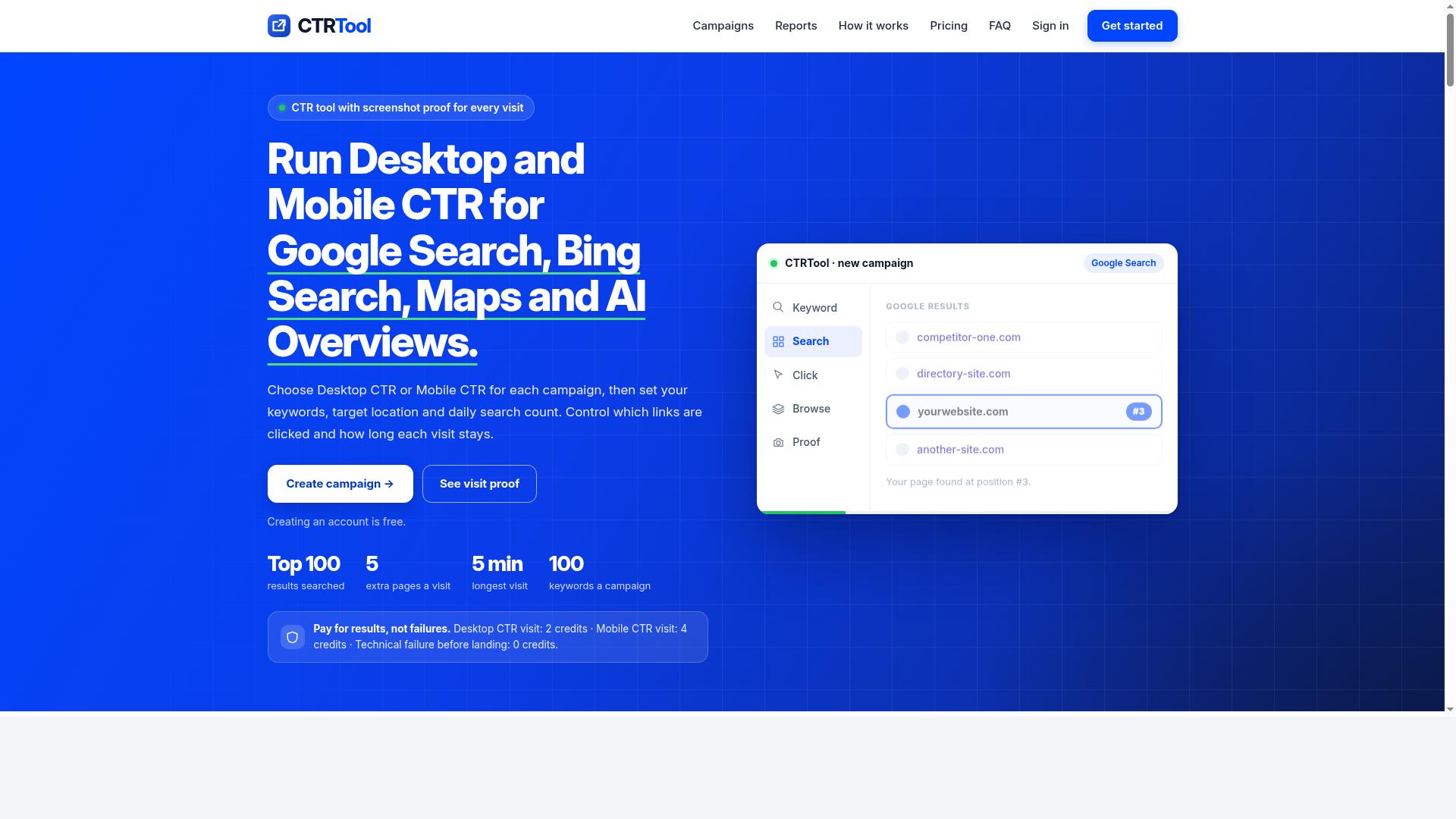
CTRTool is a SaaS platform that runs click-through-rate campaigns for Google Search, Bing Search, Google Maps, and AI Overviews, and it provides screenshot proof for every visit. That proof matters when you are switching away from an agency assassin alternative and want to see exactly what your budget produced.
It is a global online service with no country restrictions. You can point a campaign at a specific country, state, and city, or choose Any country to draw from a mix of supported locations. That flexibility lets you match keyword targeting and audience segmentation to the markets you actually sell in.
Every campaign also produces reports with full visit paths, search and website screenshots, and keyword positions over time. The next section breaks down how each of the four campaign types works.
Campaign Types: Google Search, Bing Search, Maps and AI Overviews
CTRTool offers four distinct campaign types: Google Search CTR, Bing Search CTR, Google Maps CTR, and AI Overviews CTR. Each one targets a different part of the search engine results page, so the right choice depends on where you want your listing or link to earn attention.
- Google Search CTR: enter a search keyword, then click the organic result. You can run it on Desktop or Mobile, work through the Top 100 results, and include internal pages.
- Bing Search CTR: the same keyword and organic result flow, applied to Bing instead of Google.
- Google Maps CTR: find the business listing and click its website link. Up to 50 listings are checked, with city targeting available.
- AI Overviews CTR: find your website in the AI overview and click its source link. This type requires a matching source link.
You choose Desktop or Mobile per campaign, which helps when mobile optimization is central to your plan. Setup also covers up to 100 keywords per campaign, a search depth up to 100, and daily search counts with now, spread out, or gap timing. You can define days, hours, and time zone too, and daily goals reset at 00:00 UTC.
For finer control, campaigns let you set a target URL, internal page URLs, and link text, plus click order and scrolling time. Each visit can include up to five additional pages and run for up to five minutes total. Reports then track keyword positions over time, including Search positions, Maps listing order, and AI citation order. Getting these settings right from the start is one of the most common places people slip when they leave an agency assassin alternative behind.
The 8 Mistakes, and How CTRTool's Design Prevents Them
Many agencies and SEO practitioners waste budget on CTR campaigns because of eight common mistakes that CTRTool's design directly addresses. Each error below has a matching safeguard built into how the tool runs campaigns.
The eight mistakes are:
- Choosing a tool without verifiable proof of visits
- Ignoring desktop versus mobile targeting
- Skipping keyword position and eligibility checks
- Mismanaging credits
- Getting location targeting wrong
- Losing control of which links get clicked
- Neglecting visit paths
- Failing to track campaigns properly
The H3 sections that follow explain the risk behind each mistake and the specific CTRTool feature that prevents it.
Mistake 1: Choosing a Tool Without Verifiable Proof of Visits
Without verifiable proof, you cannot confirm that a CTR campaign actually delivered the visits you paid for. That uncertainty turns every campaign into a trust exercise, and budget disappears with no accountability on either side.
CTRTool treats proof as a core part of its positioning. Every visit comes with screenshot proof, and the search screenshot and landing screenshot are delivered as separate proof images. You see the search engine results page at the moment of the visit, and you see the landing page that was reached.
This matters for agencies reporting to clients and for in-house teams justifying spend. A screenshot trail lets you audit a campaign after the fact instead of taking delivery claims at face value. When a client asks what their budget bought, the answer is visual rather than verbal.
It also changes how you evaluate any CTR tool, including an agency assassin alternative. Ask one question first: can the tool show you the visit, not just count it? If the answer is vague, the risk of wasted budget stays high no matter how attractive the pricing looks.
Mistake 2: Ignoring Desktop vs. Mobile Targeting
Serving desktop visits to a mobile-first audience, or vice versa, skews engagement metrics and wastes credits. Desktop and mobile SERP layouts differ, user behavior differs, and conversion rates rarely match between the two.
A visit that arrives on the wrong device profile does not resemble your real audience. If most of your buyers search and click on a phone, desktop visits tell you little about how that audience actually behaves. The click-through rate data you collect becomes harder to interpret.
CTRTool prevents this by letting users choose Desktop CTR or Mobile CTR per campaign. You set the device profile when the campaign is created, so visits align with the audience you are trying to mirror.
A concrete example: a mobile-focused e-commerce site should select Mobile CTR so the visits mimic real users browsing on their phones. A B2B service with a desktop-heavy audience would make the opposite choice. Either way, the decision is deliberate rather than accidental.
Before launching, check your analytics for the device split on your target keywords. That single review prevents a mismatch that would otherwise run for the life of the campaign.
Mistake 3: Skipping Keyword Position and Eligibility Checks
Launching a campaign without checking keyword position or eligibility can result in no visits and wasted credits. CTR campaigns only work if the page appears within the top 100 organic results for the chosen keyword and location.
CTRTool checks eligibility, including top 100 placement, so a keyword that cannot deliver visits is caught early rather than after credits are spent.
Eligibility rules vary by campaign type, and the tool accounts for each:
- Maps campaigns check up to 50 listings, roughly five pages of results
- AI Overview campaigns need a matching source link
These checks matter because a failed campaign is not always obvious. Visits simply do not arrive, and without a pre-check you may not know why until you have burned through a daily goal or two. Verification removes that guesswork and protects the budget you have allocated.
Position tracking does not stop at launch either. CTRTool tracks keyword positions over time, including Maps listing order and AI citation order, so you can see whether a keyword stays eligible as results shift. That ongoing view supports better keyword targeting decisions across the life of a campaign.
Mistake 4: Mismanaging Credits and Daily Search Goals
Overspending on credits or setting unrealistic daily search goals can drain your budget without delivering proportional results. CTRTool runs on a pay-for-results credit model, so the way you allocate credits directly shapes how long a campaign can run and how much coverage each keyword receives.
Before you set daily goals, understand the cost of each visit. A Desktop CTR visit costs 2 credits, while a Mobile CTR visit costs 4 credits. A verified search without a match costs 1 credit, and technical failures before landing cost nothing, which protects you from paying for visits that never completed.
The plans set a hard ceiling on what your balance can cover:
| Plan | Price | Credits | Desktop Visits | Mobile Visits |
|---|---|---|---|---|
| Starter | $59/month | 2,000 | Up to 1,000 | Up to 500 |
| Growth | $125/month | 5,000 | Up to 2,500 | Up to 1,250 |
| Scale | $399/month | 20,000 | Up to 10,000 | Up to 5,000 |
| Agency | $699/month | 40,000 | Up to 20,000 | Up to 10,000 |
Match your daily search goal to both the credit balance and the campaign duration. A Starter plan spread across a full month supports a modest daily volume, while front-loading the same balance into a few days leaves the rest of the campaign idle. Unused credits roll over while your subscription is active, so a measured pace is rarely wasted.
The other common error is burning credits on low-value keywords. Direct visits toward terms with real search intent and a ranking position worth reinforcing. One credit balance is shared across all campaign types, websites and keywords, so a careless goal on one project quietly shrinks the budget available to every other.
Mistakes 5-8: Location Targeting, Link Control, Visit Paths and Campaign Tracking
The final four mistakes, poor location targeting, uncontrolled links, ignored visit paths, and lack of campaign tracking, undermine campaign effectiveness. Each one is easy to overlook during setup and costly to discover later.
Mistake 5: Poor location targeting. CTRTool lets you target a country, state, or city, or choose "Any country" to mix locations. A vague target dilutes relevance, and visits that cannot verify the requested location use no credits, so precision protects the budget as well as the data.
Mistake 6: Uncontrolled links. Campaigns let you control which links are clicked and how long each visit stays. Sending visits toward pages outside your control exposes the campaign to variables you cannot manage, so keep every target on your own site.
Mistake 7: Ignored visit paths. CTRTool provides full visit paths, showing the sequence of pages a visitor moves through. Reviewing them reveals whether visitors land and leave or continue deeper, which is far more useful than a single landing figure.
Mistake 8: No campaign tracking. Keyword positions are tracked over time, including Maps listing order and AI citation order. Without that history you cannot tell whether a click-through rate gain came from the campaign or from an unrelated shift. Screenshot proof for every visit, with search and landing screenshots as separate proof images, closes the loop and confirms each visit actually happened.
Key Features That Make the Switch Worthwhile
CTRTool's feature set is built around accountability and control, making it a compelling alternative for agencies and SEO practitioners. Every visit comes with screenshot proof, covering both the search screen and the landing screen, so activity can be verified rather than taken on trust.
Campaigns can run across Google Search, Bing Search, Maps and AI Overviews, with per-campaign Desktop or Mobile selection to match how real users browse. Full visit paths show how each session unfolds, while keyword position tracking follows movement over time.
That tracking extends to Maps listing order and AI citation order, giving a clearer picture of visibility beyond standard rankings. For teams weighing an agency assassin alternative, these proof and tracking layers are what make the switch worthwhile.
Pricing and Plans: Starter, Growth and Scale
CTRTool offers three monthly plans in USD: Starter at $59/month for 2,000 credits, Growth at $125/month for 5,000 credits, and Scale at a higher tier for larger volume. A fourth tier, Agency, sits above Scale for the heaviest users. The plan structure matters because many switching mistakes come from picking a tier that does not match the campaign size.
Each plan is measured in credits, not visits. A Desktop CTR visit costs 2 credits, while a Mobile CTR visit costs 4 credits. That single difference explains why the same credit balance supports far fewer mobile campaigns.
| Plan | Monthly Price | Credits | Up to Desktop Visits | Up to Mobile Visits |
|---|---|---|---|---|
| Starter | $59/month | 2,000 | 1,000 | 500 |
| Growth (Recommended) | $125/month | 5,000 | 2,500 | 1,250 |
| Scale | $399/month | 20,000 | 10,000 | 5,000 |
| Agency | $699/month | 40,000 | 20,000 | 10,000 |
Starter suits a single site running modest tests. With 2,000 credits, a Desktop-only campaign covers up to 1,000 visits, which fits small keyword targeting experiments. Switch to Mobile and the ceiling drops to 500 visits.
Growth is the plan CTRTool marks as Recommended. Its 5,000 credits translate to 2,500 Desktop or 1,250 Mobile visits, enough for ongoing A/B testing across several keyword groups. A mixed device split sits somewhere between those two figures.
Scale at $399/month provides 20,000 credits, supporting 10,000 Desktop or 5,000 Mobile visits. Agency at $699/month doubles that to 40,000 credits, covering 20,000 Desktop or 10,000 Mobile visits. These tiers fit agencies running larger campaigns across multiple clients.
Two credit rules affect budgeting. A verified search without a match costs 1 credit, and a technical failure before landing costs 0 credits. Unused credits roll over while the subscription stays active but expire when cancellation takes effect.
To choose a plan, estimate monthly visits per device type, multiply Desktop visits by 2 and Mobile visits by 4, then compare the total to each tier. Weigh your device mix carefully, since mobile-heavy campaigns consume credits twice as fast. Also note the limited launch pricing: prices rise 30% on November 15, so locking in the current rate early is worth considering.
Who Should Use CTRTool
CTRTool is designed for SEO practitioners and agencies running CTR campaigns for their own or client websites across Google Search, Bing Search, Google Maps, and AI Overviews. That scope matters because a single click-through rate strategy rarely fits every surface, and the platform is built around managing campaigns across each of them.
The audience splits into two clear groups. SEO practitioners and agencies handle campaigns for multiple client properties, while in-house teams focus on organic CTR for a single brand. Both use the same core workflow, but the way they measure success differs.
The site's own guidance mentions using tier links, PBNs, and test properties. That tells you the tool is aimed at people who already understand advanced link and traffic strategies, not beginners looking for a simple headline tester. If you are switching from an agency assassin alternative, this context helps you judge whether the platform matches your existing playbook.
Agencies in particular benefit from the screenshot proof and visit paths. These give you something concrete to put in front of clients when they ask how a campaign is performing. Demonstrating results is often harder than running the campaign itself, so having that evidence built into the workflow is a practical advantage for anyone managing client relationships.
In short, CTRTool fits teams that treat organic click-through rate as an ongoing discipline rather than a one-off experiment. If your work involves keyword targeting, snippet preview, and tracking engagement across a search engine results page, the platform is built for that kind of operation.
Final Verdict: Is CTRTool the Right Alternative?
CTRTool stands out as a CTR campaign tool with verifiable screenshot proof, flexible device and location targeting, and transparent pricing, making it a strong alternative for agencies seeking accountability. If your switch away from an agency assassin style tool went wrong, the fix usually comes down to choosing a platform whose results you can actually check.
That is the core promise here. Every visit is backed by proof, so clients and stakeholders can see what was delivered rather than trusting a dashboard summary. For agencies that answer to paying clients, that difference matters more than a long feature list.
The platform supports four campaign types, giving practitioners room to match a campaign to a specific goal instead of forcing every project into one format. Desktop and Mobile selection is available too, which helps when a client's audience behaves differently across devices.
Eligibility checks add another layer of control before a campaign goes live. Pricing is presented clearly, so you can weigh cost against scope without chasing a quote. For questions, the support email listed is vaibhav@autoblogging.ai, and the site also includes Support and Terms of use pages.
Are there limitations? The FAQ lists an email contact only. No phone number, physical address or opening hours are stated, so agencies that expect live phone support should plan around email communication. That is a fair trade for a focused tool, but it is worth knowing before you commit.
For agencies and SEO practitioners who prioritize verifiable results, the recommendation is clear. Choose CTRTool when accountability, device and location control, and straightforward pricing matter more than a sprawling feature set. It is a credible, transparent alternative, and the proof-first approach is exactly what makes a switch worth completing.
Frequently Asked Questions
What makes CTRTool different from other CTR tools I might switch to?
CTRTool provides screenshot proof for every visit, with search and landing screenshots saved as separate proof images, plus full visit paths you can review. It also tracks keyword positions over time, including Maps listing order and AI citation order, and runs on a pay-for-results credit model. This combination of verifiable proof and position tracking is the core of its "CTR tool with screenshot proof for every visit" positioning.
Which platforms and campaign types does CTRTool support?
CTRTool runs Desktop and Mobile CTR campaigns for Google Search, Bing Search, Maps and AI Overviews. You choose Desktop CTR or Mobile CTR per campaign, set your keywords and target location, and can point campaigns at internal pages as well as the main result. Each campaign type has its own requirements, so check them before launching.
What are the eligibility requirements for a campaign to work?
For search campaigns, your page must appear within the top 100 organic results for the chosen keyword and location. Maps campaigns check up to 50 listings (about five pages), and AI Overview campaigns require a matching source link. Meeting these requirements up front avoids wasted credits and failed visits.
How does pricing and the credit system work?
CTRTool offers monthly plans in USD: Starter at $59/month for 2,000 credits (up to 1,000 Desktop CTR visits or 500 Mobile CTR visits) and Growth at $125/month for 5,000 credits (up to 2,500 Desktop or 1,250 Mobile visits). Because it is a pay-for-results credit model, plan your campaign volume against these visit limits rather than assuming every credit maps to one visit.
Can I target specific countries or cities with my campaigns?
Yes. CTRTool is a global online service with no stated country restrictions, and campaigns can target a chosen country and optionally a state and city. You can also select "Any country" to use a mix of supported locations. Setting location precisely matters because search results and Maps listings differ by area.
Who is CTRTool designed for, and how do I get support?
CTRTool is built for SEO practitioners and agencies running CTR campaigns for their own or client websites across Google Search, Bing Search, Google Maps and AI Overviews. If you need help during or after your switch, contact support at vaibhav@autoblogging.ai. You can also review the Terms of use and Legal notices pages before getting started.